Email Newsletters & Campaigns
Send promotional emails, newsletters, or announcements to your entire client list or a targeted segment — directly from Nuvoro.
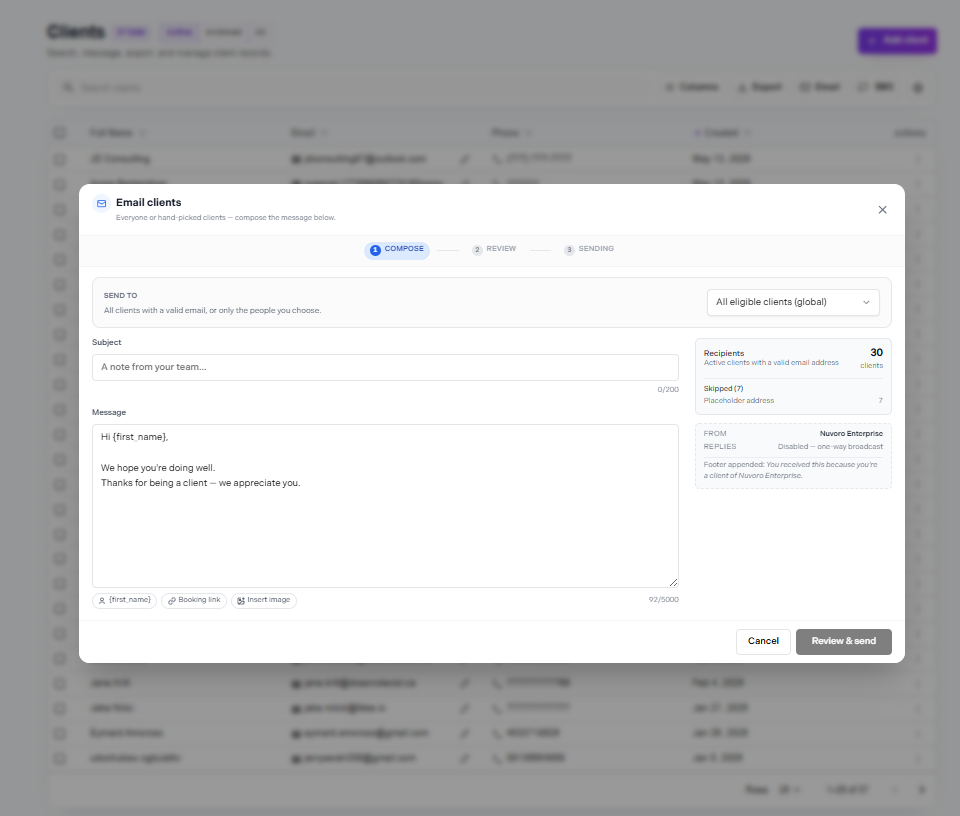
The Email Campaign builder
Campaign Overview
The Email Campaigns tool lets you send one-off emails to groups of clients. Unlike the automated message templates (which send automatically after bookings), campaigns are manually triggered — useful for promotions, seasonal announcements, newsletters, or re-engagement emails.
Different from appointment emails
Campaigns are entirely separate from the automated booking confirmation, reminder, cancellation, and reschedule emails. Those are configured in Settings → Message Templates and send automatically. Campaigns are sent manually whenever you choose.
Creating a Campaign
Go to Clients → Email Campaigns
Find the Campaigns section within the Clients area.
Click + New Campaign
The campaign builder opens.
Enter a subject line
This is what clients see in their email inbox. Keep it short and clear — under 50 characters is ideal.
Write the email body
Use the rich text editor to compose your message. Add links, bold text, and any relevant details.
Choose your audience and send
Select who receives the campaign, then send immediately or schedule for later.
Choosing Your Audience
Before sending, select who the campaign goes to:
All clients
Sends to every client in your database who has an email address on file.
Specific clients
Search and manually select individual clients to include.
Only clients with email addresses are included
Clients without an email address on their profile will not receive the campaign regardless of the audience selection. Ensure profiles are complete for best reach.
Sending or Scheduling
Once your campaign is ready, you have two options:
Send now
The campaign is dispatched immediately to all selected recipients. There's no undo — double-check your content and audience before clicking.
Schedule
Pick a date and time for the campaign to go out automatically. Useful for timed promotions or ensuring emails arrive during business hours.